Free Open-source No registration
Throw a Secret Santa with Webex Messaging
Randomly assign to each member of your Webex space a person to whom they anonymously give a gift. Compatible with Webex Free, no other account needed.
How does it work?
-
Sign in with Webex
Click on "Run on Webex" above and connect with your Webex Messaging account. You will be asked to accept the integration permissions, nothing else to install.
-
Select the participants
We list all the members of your team (bots excluded, they don't do nice gifts). Tick the ones who take part.
-
Set your rules
Add exclusions to keep couples or managers from drawing each other. Write a message for everyone (budget, deadline, party date) and, if you like, private notes about each participant, such as a delivery address or a food allergy.
-
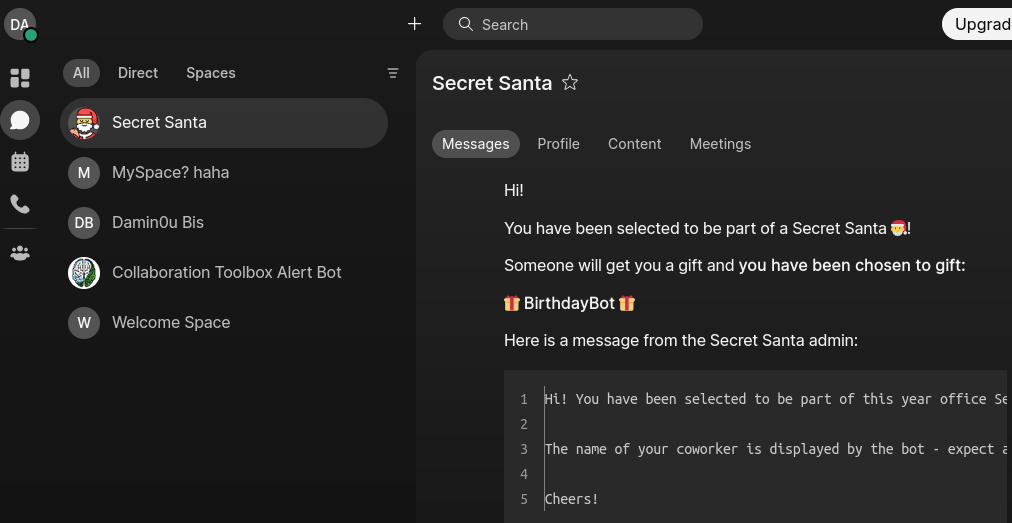
Everyone gets a private message
We shuffle the participants and the Secret Santa bot sends each of them a private message with the name of the person to gift, along with your message.
-
Buy a gift
Everything is set. Go find a gift for your peer before the party. Merry Christmas!

 Secret Santa Bot
Any question? Head over our FAQ to learn more about this integration.
Need help? Read the FAQ or write to us.